


My Premise Health
4.5574.00 Reviews
App Specs
- Version
- 11.7.3
- Updated On
- License
- Free
- Downloads
- 100,000+
- Developer
- Premise Health Holding Corp
- Categories
- Medical
- Platform
- Android
Screenshots
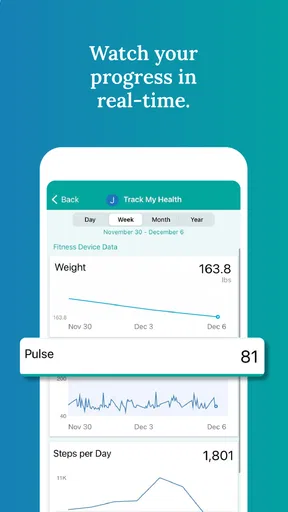
 Analysis by AppCompare
Managing healthcare is rarely difficult because of one complicated task. The real frustration usually comes from small jobs scattered across different places: finding a health record, checking a message, arranging care, or remembering where a useful document was stored. My Premise Health is designed to bring those tasks into one mobile health experience. After spending time with it, I see its main value less as a replacement for every medical service and more as a practical front door to information connected with Premise Health.
That distinction matters. This is a medical app from Premise Health Holding Corp, and it is free to use with an Everyone age rating. Its purpose is personal health access rather than fitness tracking, entertainment, or general medical education. If your healthcare is connected to the Premise Health environment, the app can reduce the need to jump between phone calls, paper documents, and separate digital tools. If it is not, its usefulness is naturally much narrower.
How My Premise Health feels in everyday use
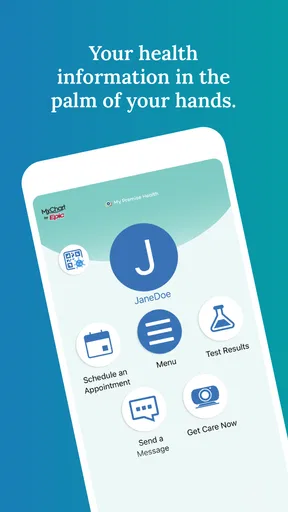
The first thing I noticed is that the app’s usefulness depends more on access and organization than on flashy presentation. A health app earns its place on my phone when it helps me answer a simple question quickly: where do I go to handle this healthcare task? My Premise Health aims to make that answer easier by placing health information within reach on a mobile device.
That makes it especially suitable for people who already use Premise Health services and want a convenient companion between appointments. Instead of treating the phone as a separate channel, the app makes it part of the routine. I can imagine using it before a consultation to review information, during a busy workday when opening a desktop site is inconvenient, or afterward when I need to revisit something without searching through email.
The app is not the right choice for someone looking for a universal symptom checker, a medication reminder, a workout dashboard, or an emergency-care tool. Those needs call for different products. It also should not be treated as a substitute for urgent medical attention. Its role is administrative and informational access around an existing healthcare relationship, not instant diagnosis.
Speed expectations on a phone
For this kind of app, perceived speed is about how quickly I can move from opening it to the information or task I need. A medical app does not need animation or visual effects; it needs a clear path and a calm interface. My Premise Health benefits when its screens keep that purpose in mind. The less time I spend figuring out where a health-related item belongs, the more useful the app feels.
There is also an important difference between the app opening quickly and health information appearing quickly. The first depends on the phone and the app itself, while the second can depend on account access, connectivity, and the service behind the screen. I would therefore judge it by the whole journey rather than by launch speed alone. A fast start is helpful, but it does not guarantee that every connected part of a healthcare workflow will respond immediately.
Worth Reading Before You Choose

EA SPORTS FC Mobile 26 Is a Bigger Football Game, but It Takes Time

Flipboard Shows What News Apps Must Do Beyond the Feed

Switching to Android Auto Means Rethinking Your Driving Routine

Google Calendar Makes a Crowded Week Easier to Manage

Ludo King Makes the Most of the Minutes Between Plans

Baby Panda World Brings Quick Play to Modern Phones, but Its Game Library Feels Busy
My practical advice is to open the app before you are under pressure. Signing in or confirming access during a calm moment is much better than waiting until you are standing in a clinic, trying to find an important detail. This is one of those small habits that makes a health app feel considerably faster, even when the underlying network conditions are unchanged.
What happens during heavier use
The most demanding moments are likely to be the moments when I need several pieces of information together: preparing for a visit, reviewing older health details, or moving between different parts of the account. That kind of use tests navigation more than raw graphics performance. A well-organized medical app should let me return to the main path without losing track of what I was doing.
My Premise Health is best approached as a focused utility rather than an app I leave open all day. I would open it for a purpose, complete the task, and close it. That usage pattern is also kinder to the phone than repeatedly leaving a healthcare app running in the background. Since the app is not built around constant entertainment or continuous tracking, there is little reason to keep it active when I am not using it.
A useful workflow is to prepare a short list before opening the app. For example, I might decide that I want to check a health detail, review a message, and confirm what I need for an upcoming interaction. Handling related tasks in one session is more efficient than opening the app repeatedly for single questions. It also makes it easier to notice whether something still needs attention before I finish.
There is a trade-off here. Combining many healthcare tasks in one place is convenient, but it can make the app feel more important than it really is. I would not use it as my only record of medical information. For a major appointment, I would still keep essential questions and personal notes separately, because a mobile account is a helpful access point, not a complete substitute for personal preparation.
Stability and the importance of account access
Stability in a health app has two layers. The first is whether the application itself behaves consistently on the phone. The second is whether it can reliably connect to the services and information that make it useful. Even a smoothly running app cannot display current account information if the connection is interrupted or if access has not been set up correctly.
That is why I would test My Premise Health in advance rather than making my first attempt during a time-sensitive appointment. A quick check can confirm that the app opens, that I can reach the relevant area, and that I remember the sign-in details. This is not busywork; it is a sensible recovery plan for any healthcare tool that may be needed when I am distracted or rushed.
If something does not load, I would first separate the problem into two possibilities: is the app failing to open or navigate, or is a connected health service failing to return information? Restarting the app and checking the phone’s connection are reasonable first steps. If the issue concerns account access or healthcare records, I would use the appropriate support route rather than repeatedly tapping the same screen. Repeated attempts rarely solve an account problem.
The app’s public presence suggests a reasonably established user base, with over a hundred thousand installs and an average rating of 4.5 from around a thousand ratings. Those figures do not guarantee a perfect experience for every person, but they do indicate that the application is not an obscure experiment. I read that as a positive sign for people who want a dedicated Premise Health companion rather than an unofficial workaround.
Device limits and what to expect from the current version
My Premise Health requires at least iOS or Android version 11, so compatibility is an important first checkpoint. Anyone using an older phone or an older operating-system release should check that requirement before planning around the app. A healthcare tool that cannot be installed on the device you carry every day is not useful, however good its design may be.
On a supported device, I would expect the app to behave like a focused utility rather than a demanding media application. Its work is centered on presenting health information and account-related services, not rendering complex scenes or processing large creative projects. That generally makes it a sensible type of app to keep available, although the exact experience can still vary with the phone, operating system, connection, and account setup.
Storage is another practical consideration, even when an app itself is not visually elaborate. I would keep some free space available on any phone used for healthcare because operating-system updates and temporary files can affect many apps at once. More importantly, I would avoid testing a major update immediately before an appointment. The current version is 11.7.3, and keeping the app updated is sensible, but timing matters when access to health information is important.
Privacy also changes how I would use it. A health app belongs on a device protected by a screen lock, especially if the phone is shared with family members or left unattended at work. I would sign out or use the device’s own protection when appropriate, and I would avoid displaying sensitive health information in public. These are not special tricks for one particular screen; they are basic safeguards that become more important when personal medical details are accessible from a phone.
Where it fits beside ordinary healthcare alternatives
The usual alternative is a web portal opened in a browser. A browser can be better when I am using a larger screen, comparing information, printing something, or working from a computer. It may also be preferable when I do not want another app installed. The advantage of the mobile application is convenience: it is already positioned on the device I carry, so checking health information does not require remembering a website or opening a desktop.
Another alternative is calling a clinic or health-service representative. A phone call remains valuable when a situation is complicated, urgent, or too personal to handle through a screen. My Premise Health is better for routine access and self-service moments, while a person is better when I need clarification, judgment, or help resolving an account issue. I would not choose the app simply because it is digital; I would choose it when the task is straightforward enough to handle independently.
General health apps can offer broader tools, but that breadth is also their weakness here. A generic health organizer may collect information from different sources, yet it may not provide the same direct connection to Premise Health services. Conversely, a general app may be a better fit for someone who wants exercise trends, nutrition logging, or a single dashboard across unrelated providers. The right choice depends on whether direct Premise Health access or broad personal tracking matters more.
Who will get the most from it
I would recommend My Premise Health to someone whose care is already associated with Premise Health and who wants a mobile way to stay connected. It is particularly useful for people who dislike searching through messages or relying on memory to find health-related details. It can also suit users who prefer handling routine tasks privately and at their own pace rather than making a call for every small question.
Consider a realistic workday. I might have a short break between meetings and realize that I need to review information before a healthcare conversation later in the week. A computer may not be nearby, and calling at that moment may be inconvenient. Opening the app gives me a focused place to check what I need, make a note of anything unclear, and return to work. The value is not dramatic; it is the removal of several small obstacles.
It may also help a family member who assists another adult with healthcare organization, but I would be careful with shared-device use and account boundaries. Convenience should not lead to casual sharing of passwords or leaving personal information visible. The app can make access easier, but responsible access still depends on the user.
I would skip it if I am not connected to Premise Health, if I need emergency guidance, or if my main goal is detailed wellness tracking. I would also prefer a browser or direct human support when I am working on a large screen, dealing with a complicated issue, or trying to resolve a problem that requires explanation rather than retrieval.
Small habits that improve the experience
My first tip is to treat the app as part of appointment preparation, not only as a last-minute rescue tool. Open it ahead of time, review the information you expect to need, and write down questions separately. This reduces pressure and helps reveal whether you are looking for information the app can provide or for advice that must come from a healthcare professional.
My second tip is to group related actions into one session. If I am already checking one health item, I would take a moment to look for other pending details rather than closing the app immediately. This can save repeated sign-ins and makes the app more valuable without requiring constant use.
My third tip is to create a backup habit for important moments. I would not rely on a single mobile screen for a time-sensitive appointment. Keeping the appointment details, questions, and any essential personal notes in a separate safe place gives me a fallback if the phone battery is low, the connection is poor, or access needs attention.
A fourth, less obvious trade-off is that convenience can encourage passive checking. Health information is useful when it leads to a decision, a question, or better preparation. Reopening the app repeatedly without a clear purpose can create worry rather than clarity. I get more from it when I use it to support a specific healthcare task.
My performance verdict
My Premise Health succeeds when I treat it as a direct mobile doorway to an existing healthcare relationship. Its strongest quality is practical access: the app puts relevant health information closer to the moments when I actually need it. The free price removes a financial barrier, and the Everyone rating makes its intended audience broad, while the minimum operating-system requirement gives older-device users an important compatibility check.
It is not a universal medical toolkit, and I would not recommend it as one. Its usefulness depends on Premise Health access, and its performance depends on more than the app installed on the phone. Connection quality, account setup, device age, and the complexity of the task all affect the experience. Those limits are normal for a connected medical service, but they are worth understanding before relying on it.
Overall, I see it as a worthwhile companion for eligible Premise Health users who want routine access without reaching for a computer. The developer, Premise Health Holding Corp, has built an app aimed at a clear need rather than trying to become every kind of health tool at once. With sensible preparation, a protected device, and realistic expectations about what mobile access can do, My Premise Health can make everyday healthcare organization feel less scattered.
My final recommendation is simple: install it if your care is already tied to Premise Health and you value convenient phone access. Before depending on it for an important interaction, sign in, explore the areas you expect to use, and keep a backup plan for essential information. For those users, My Premise Health is a focused and practical medical app; for everyone else, a broader health platform or direct support channel will likely be the better fit.
Pros
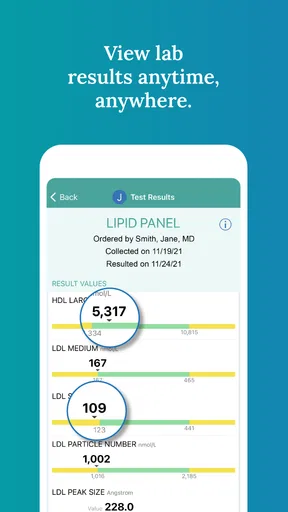
- Secure access to health records
- test results
- and care information in one place.
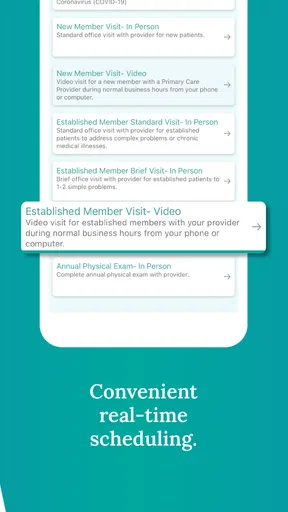
- Appointment scheduling and reminders help keep healthcare tasks organized.
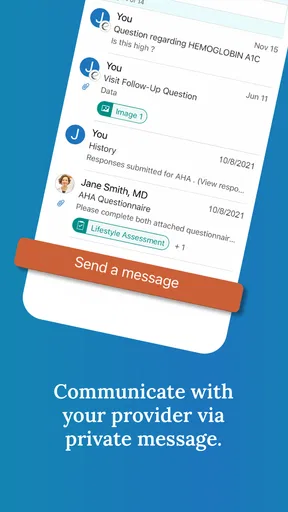
- Messaging features make it easier to contact participating providers securely.
- Supports virtual visits when telehealth is available through your health plan.
- Personalized wellness tools can encourage healthier habits and preventive care.
Cons
- Only works fully with participating employers
- providers
- and health plans.
- Some features may vary depending on your organization’s Premise Health setup.
- Login or verification issues can make access frustrating for some users.
- Certain appointments or services may still require contacting the provider directly.
- The app may request sensitive health permissions and personal information.
FAQs for My Premise Health
What is My Premise Health used for?
My Premise Health is a healthcare management app for eligible Premise Health members. After signing in, users can typically view health information, manage appointments, communicate with care teams, review certain visit details, and access available wellness or benefit resources. The exact features depend on the employer, health plan, and Premise Health services connected to the user’s account.
Who can use the My Premise Health app?
The app is generally intended for people who receive healthcare services or benefits through Premise Health, often through an employer-sponsored program. Access is not automatically available to everyone. You may need an eligible account, member information, or an invitation from your organization. If your employer or provider does not participate, downloading the app alone may not provide access to its features.
How do I sign in or create an account?
To use My Premise Health, you normally need to register with information associated with your Premise Health membership or employer-sponsored healthcare program. Depending on your organization, registration may involve verifying your identity, creating login credentials, and completing security checks. If you forget your password or cannot verify your account, use the in-app recovery options or contact your organization’s support team.
Can I schedule appointments and communicate with a provider?
Appointment scheduling and secure communication may be available, but the options can vary by location, clinic, provider, and health plan. In supported accounts, the app may allow you to request or manage appointments, receive messages, or follow up about care. It should not be treated as an emergency service; call local emergency services for urgent or life-threatening medical situations.
Is My Premise Health safe for viewing personal health information?
My Premise Health is designed to provide access to personal healthcare information through a protected account, but users should still take normal security precautions. Use a strong, unique password, enable device security, avoid signing in on shared devices, and keep the app updated. Review the app’s current privacy policy and permissions before use, since data practices and available features may change.


